# turno-browser 0.12.0 (/releases/browser/0-12-0)
A side panel in the agent's own Chrome window shows what it does, teach mode saves a task you do once as a flow, and the live view draws each kind of action in its own look and color.
Released 2026-11-28.
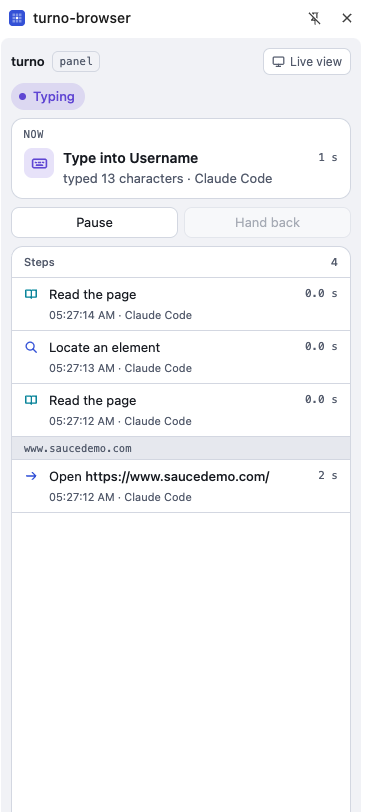
**[turno-browser](/browser)** now shows what the agent does in the window where it does it: Chrome's side panel, next to the page, lists its steps and has Pause and Hand back. From the same panel you can show the agent a task once and keep it as a flow. The live view, for watching from another window, draws each kind of action in its own look and color.
## Upgrade [#upgrade]
**The side panel is on by default** in a Chrome with a window that turno starts, with the live view on. It is not loaded for a headless Chrome, in attach mode, or with Lightpanda or Camoufox. It takes its width from the page, as Chrome's side panel does for anyone. To turn it off for an identity:
```sh
turno-browser set school --side-panel false
```
identity.json keeps it as `"sidePanel": false`, in format 14.
**The live view draws each action with pixels**, in the Balanced mode. The Effects control in the view's header has Full and Calm too, and the choice is kept in that browser. A laptop on battery starts in Calm until you pick a mode, and with reduced motion or without WebGL2 the view is Calm.
**Update `turno-cli` and `turno-browser` together**: turno-browser's API goes to 1.15, and turno 0.6.3 needs it.
## Highlights [#highlights]
The agent's own Chrome window shows what it does in Chrome's side panel, next to the page, and you do not have to open anything: the state, a "Now" card with the step the agent runs and how long it has run, its steps with an icon and a color per kind, "Thought for 4 s" between calls and a line where it moves to another site.
Pause and Hand back are there, and when the agent waits for you (a person step, the last click, a passkey, a captcha) an amber card says what to do, with "I am done". "Live view" opens the full view in an app window, and "Teach a flow" starts teach mode.
The panel is a small extension that ships inside turno-browser and that Chrome loads at each start over the DevTools protocol. Its only permission is `sidePanel`: it has no content scripts, no host permissions and no web accessible resources, so it reads and changes no page. It reads the live view's server on 127.0.0.1, with a code that works once and a token of its own. Like the live view's timeline, it shows no typed text, and it gets no picture of the page.
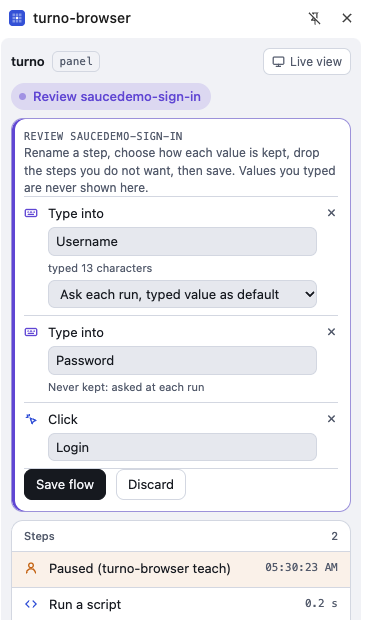
Do a task once in the window of the identity's Chrome, as you always would, and turno-browser writes each step down. It is saved as a normal [flow](/docs/browser/flows) that the agent runs with `browser_replay` and you with `turno-browser replay`. Start it with "Teach a flow" in the side panel, or from the shell with `turno-browser teach school --name submit-timesheet`. The agent waits while you teach.
Clicks, typing, choices, checkboxes, Enter, Escape and Tab, uploads, new tabs and typed addresses are written down, with the recorder's rules:
- What you type is a parameter, with what you typed as its default.
- A password or a one-time code keeps no value: the flow asks for it at each run.
- A sign-in on a site of the vault is one `browser_login` step.
- Addresses keep no query string or fragment.
The panel lists the steps as they come, showing only how many characters you typed. Stop shows a review where you rename a step, choose how each value is kept, drop steps and save.
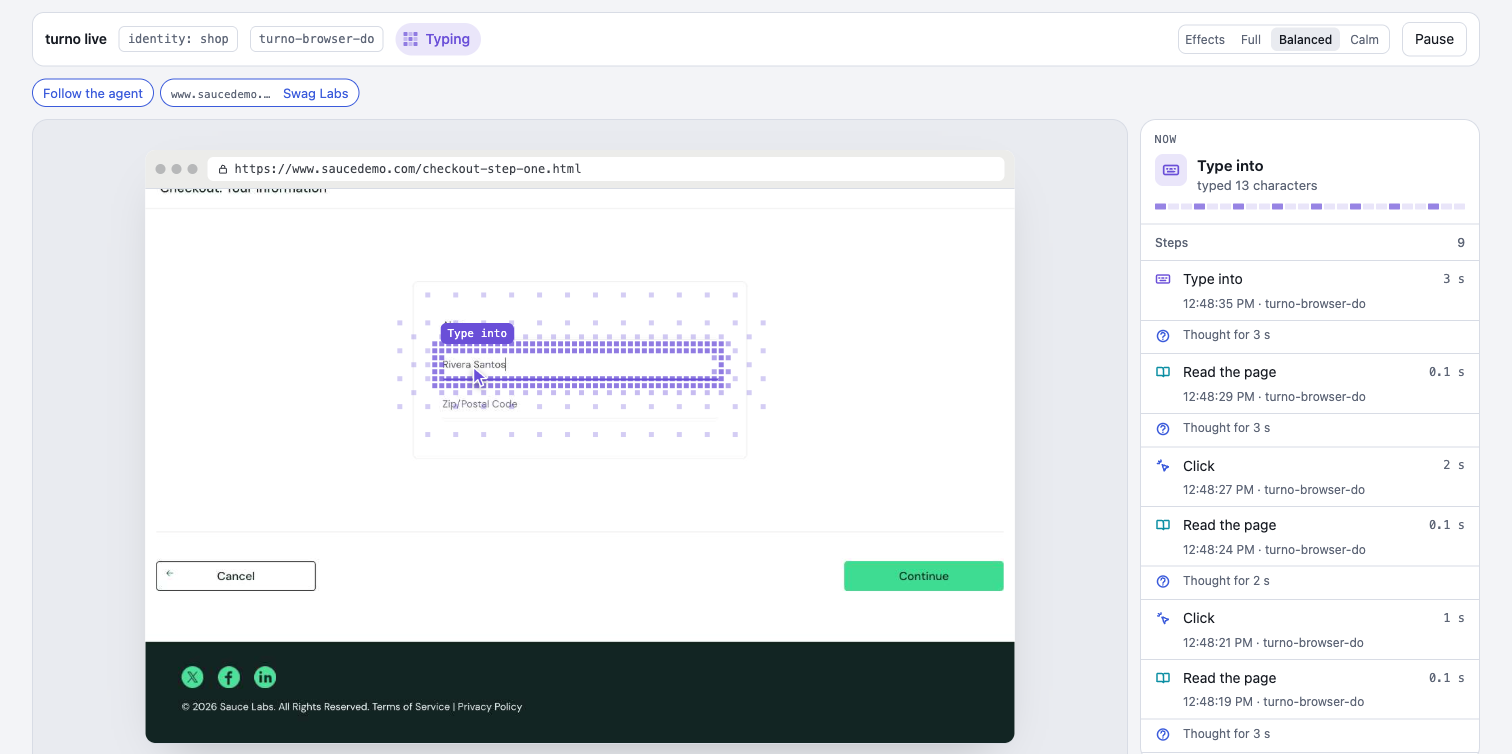
A layer of pixels over the agent's tab, drawn by the view's own WebGL2 shader, gives every kind of action its own look and color, so you can tell what the agent does without reading the timeline. A box converges on the element the agent clicks or types into and a ripple marks where a click lands, a band scans the page while the agent reads it, the picture dissolves as it opens a page, and a trail follows a scroll or a drag.
Typing is violet, reading cyan and a failure red, with its code when it has one. A click the last-click rule leaves to you is amber and says "Handed to you", not a failure. A step that waits for you is amber too, and the "Now" card says what to do and has the "I am done" button. The end of a run is green. The effects never say what the agent typed, only how many characters.
The Effects control in the header has three modes, kept in that browser:
- **Full**: a field of pixels around the window, denser near the element the agent works on, that breathes while the agent thinks.
- **Balanced** (the default): pixels only where the agent acts, and nothing drawn between actions.
- **Calm**: plain boxes and ripples, no pixels. A laptop on battery starts here until you pick a mode.
The effects run only while something moves and the view is visible, at most 30 frames a second, and an effect over the page ends with its step. `turno-browser live school` opens the view.
## More [#more]
- **The live view's panel** has a header with the state and the identity, a "Now" card, and a timeline with an icon and a color per kind of step, the time the agent thought between calls and a line for each site it moved to.
- **Chrome's highlight of the element**, the default [agent cursor](/docs/browser/agent-cursor#drawn-by-chrome-the-default), is blue for a click, violet while the agent types and red for a moment when the call fails. While the agent waits for you, the step's target gets an amber box, or the page an amber outline.
- **The banner of a person step** in the page is amber too, the color of a step that waits for you.
- **`turno-browser teach `** alone says where a teach mode stands; `--save` and `--cancel` end one started elsewhere, and `--stop` leaves the review to the side panel.
- **The API goes to 1.15**, with `liveTeach`.
## Links [#links]
- Full changelog: [turno-browser](https://github.com/wimo-dev/turno/blob/main/packages/browser/CHANGELOG.md).
- [The side panel](/docs/browser/live-view#the-side-panel-in-the-agents-window), [what each action looks like](/docs/browser/live-view#what-each-action-looks-like) and [the timeline](/docs/browser/live-view#the-timeline).
- [Teach mode](/docs/browser/teach-mode), [flows](/docs/browser/flows) and the [`teach` command](/docs/browser/reference/cli#turno-browser-teach).