Teach mode
Show the agent a task once in its own Chrome window; it is saved as a flow the agent runs again.
Teach mode turns a task you do once into a flow: you do it in the window of
the identity's Chrome, as you always would, and turno-browser writes each step down. The agent then
runs it with browser_replay, and you with turno-browser replay, the same way as a flow the agent
recorded itself.
Start it
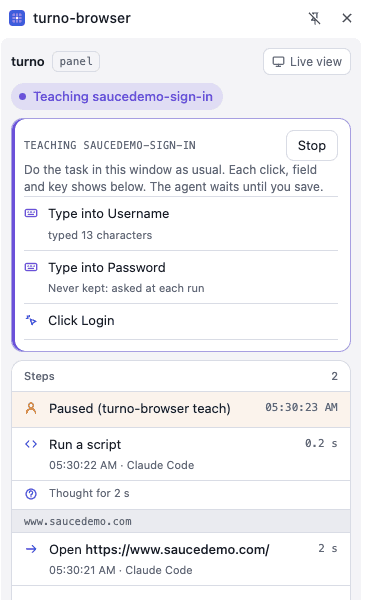
From the side panel: press Teach a
flow, give the flow a name (lowercase letters, digits, - and _) and press Start. Then do
the task in that window. Each step shows in the panel as you go: the kind of step, the element it
went to, and for typing only how many characters you typed.
From the shell:
turno-browser teach school --name submit-timesheet --url https://portal.example.edu/timesheetIt starts the identity's browser first when nothing serves it (through its
background server), opens --url as the first step, and waits. Enter
in the terminal saves every step as shown; Ctrl-C drops them. --save and --cancel end a teach
mode started elsewhere, --stop ends the listening and leaves the review to the side panel, and
turno-browser teach school alone says where it stands.
The agent waits while you teach: its next call is held as during a pause, and goes on when the flow is saved or dropped.
What is written down
Your own input in the window, nothing the page does by itself:
| You do | The flow's step |
|---|---|
| Type an address in the address bar, or open one from a bookmark | browser_navigate |
| Click a button, a link or another element | browser_click |
| Type into a field | browser_type, with what you typed as a parameter |
| Pick an option in a list | browser_select_option |
| Check or uncheck a box | browser_click on it |
| Press Enter, Escape, Tab or Shift+Tab | browser_press_key |
| Choose a file to upload | browser_file_upload, whose file is a parameter given at each run |
| Open a new tab, or move to another one | browser_tabs |
Each element is kept the way a recorded flow keeps it: its role and accessible name, its visible text, its CSS path, and the fingerprint replay checks before it acts. Links you follow and forms you send are not steps of their own: the click or the Enter that did it is. Input inside a frame is not written down.
The rules for values are those of browser_record:
- What you type is a parameter, with what you typed as its default. The review can make it a fixed value instead, or a parameter with no value kept.
- A password, a one-time code (also a field named only
codein a sign-in form), a card number, a field named like one, or a value of the vault never keeps its value: the flow asks for it at each run, and the review cannot make it fixed. - A sign-in on a site of the vault is one
browser_loginstep with the site's name: the fields you typed into become that step, and your own submit is dropped when the vault submits. - Addresses keep no query string or fragment (they can carry tokens).
Review and save
Stop ends the listening and shows the review. For each step you can rename its element (the name the flow and the agent see), choose how a typed value is kept, and remove the step. The values you typed are never shown in the panel, only their length.
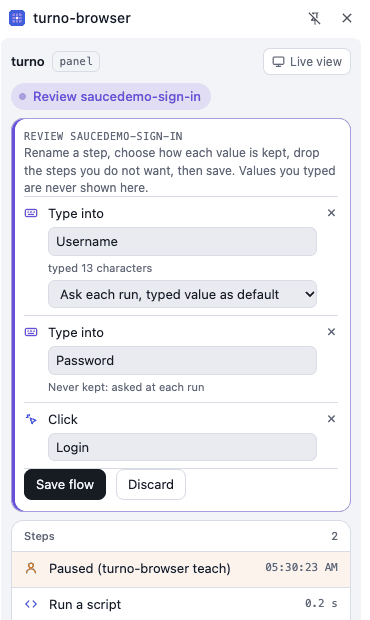
Save flow writes it to ~/.local/share/turno/browser/flows/<id>/<name>.json and gives the
browser back to the agent; Discard drops it. turno-browser flows school submit-timesheet lists
its steps and parameters, and the agent sees it in browser_flows.
What the page can tell
Nothing that a person using the page would not cause. Teach mode listens from an isolated world of
its own in each tab's top document, made over the DevTools protocol (Page.createIsolatedWorld):
it shares the page's elements but none of its JavaScript, so the page's scripts cannot see its
listeners, its variables or its calls, and it adds nothing to the page. It reports through a
protocol binding added to that world only, so the page's own world never has the function.
Runtime.enable is never sent. Navigations come from the protocol, not from the page.
On the reputation bench's probe page,
with teach mode on, the page sees no added element (page-nodes 0) and no call in its main world
(main-world-calls 0), headed and headless.
Limits
- turno's own Chrome only: not attach mode, Lightpanda or Camoufox, and the live view must be on.
- A file dialog does not open in the agent's window (Chrome hands it to the agent's tools): the step is written down, and the file is asked for at each run.
- Input inside a frame, drag and drop, and hovering are not written down. A flow can still be
finished by hand: the agent can record the rest with
browser_record.