DocsConcepts
Profiles
A profile is one account of one agent, as a folder and a launcher.
This page explains what a profile is, what its launcher does, and where an account does and does not follow you.
A folder and a variable
A turno profile is a folder (~/.claude-work) plus an environment variable that points the agent at it: CLAUDE_CONFIG_DIR for Claude Code, CODEX_HOME, COPILOT_HOME and CURSOR_CONFIG_DIR for the others. The launcher (claude-work, turno work, turno auto) exports that variable and then replaces itself with the agent.
The agent is the vendor's own, unmodified command-line tool. It logs in by itself, inside that folder; turno never reads, copies or forwards login tokens.
turno profile add work --color violet     # ~/.claude-work and the claude-work command
turno profile listProfiles ───────────────────────────────────────────────────────────────────────
agent account folders role
personal Claude Code you@personal.example · pro no folders default
work Claude Code you@work.example · max 1 folder
turno <name> opens one; turno profile assign <dir> gives a folder its profile.What profiles share
Profiles of one agent share what is not the account, through links to the agent's own folder (turno calls it the hub: ~/.claude, ~/.codex):
| Agent | Shared between its profiles |
|---|---|
| Claude Code | projects, sessions, skills, plugins, settings |
| Codex CLI | sessions, prompts, skills, AGENTS.md |
| GitHub Copilot CLI | session-state |
| Cursor CLI | nothing |
That is why turno work --resume <id> continues a Claude Code session that another account started. turno profile repair relinks shared items and rewrites launchers when turno doctor finds one out of place.
Three roles in config.toml
system = "personal"     # account the plain `claude` command uses ("" for none)
default = "personal"    # profile for folders without a rule
# fallback = "work" # optional, off unless set; read "Vendor terms" firstsystemnames the account signed in at the hub, the one a plainclaudeuses.defaultis the profile for folders without a rule.fallbackis off by default. It chooses which of your own accounts opens a folder while another is marked exhausted. Vendors' usage policies forbid creating or using accounts to get around usage limits or safeguards, so read your plan's terms before you set it, and do not use it for that. See Vendor terms.
Where the account goes, and where it does not
The account follows the environment. Everything the agent starts inherits it, so it runs with the same account:
- Claude Code subagents, which run inside the same process.
- Commands of the Bash tool, hooks, and stdio MCP servers that the agent starts itself.
- A
claude -p ...orcodex exec ...that the session runs. turno openand theBROWSERthe launcher sets, so claude.ai links open with that account.
MCP servers behind the gateway are the exception: mcpd starts them, not the session. turno tells mcpd which profile and session a request comes from, and a server can have a variant per profile.
Anything started without the variable uses the hub's account: a plain claude in a new terminal, scripts that clear the environment (env -i, sudo), cron jobs and LaunchAgents, and apps opened from the Dock. The guide lists three ways to close that gap.
turno auto never switches in silence
When a rule names a profile that does not exist (or there is no rule and system = ""), turno auto exits 3. When the folder's profile has no launcher, or config.toml does not parse, it exits 1. Either way it prints the reason and the command that fixes it. turno profile which --check tells a script the same before it runs anything: 0 ready, 3 no profile, 4 not signed in (exit codes).
The status line
For Claude Code, turno draws a status line under the prompt with the profile and what its account has used:
- 1Profile and plan. The pill. Its color comes from the profile's color in config.toml.
- 25 h usage. The account's 5 hour window and the time until it resets.
- 3Weekly usage. The account's weekly window and the time until it resets.
- 4Context. Context used, as a bar and as tokens.
- 5Turns left. Turns left in the 5 h window, estimated from recent turns.
- 6Project and branch. The project (and worktree) and its git branch, read without running git.
- 7Lines changed. Lines added and removed.
- 8Model and effort. The model of the conversation and its effort.
- 9Cost. The API-equivalent cost of the conversation, subagents included.
turno ui install                     # font + statusLine in the shared settings.json
turno ui install --terminal current  # also set the font in this terminal
It uses Nerd Font icons where the terminal has them and Unicode icons everywhere else. This is the real thing, in both looks:
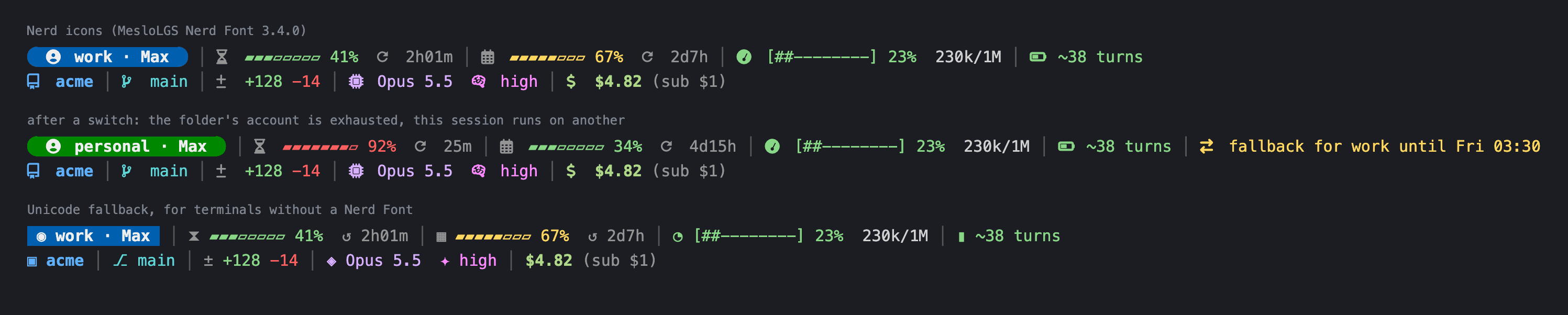
When the folder belongs to another profile than the one the session runs with, row 1 ends with a warning.
Service accounts and the accounts bridge
A service account is a Linear workspace, a mail connector or any other MCP server that one profile reaches. A builtin MCP server (builtin = "accounts" in mcp.toml) lets a session in one profile delegate a task to a service account that only another profile is signed into:
turno identity add linear:work --profile work --tools 'mcp__linear__*' \
  --read-tools 'mcp__linear__get_*,mcp__linear__list_*' --confirm writes
Reads run with only the account's read tools. Writes, and by default every call to a mail or messaging account, need your confirmation. Every call and its decision go to a hash-chained audit log (turno identity log, and --verify checks the chain). See Security and privacy.