turno 0.5.2
An agent cursor that shows where the agent acts, turno-browser init for the first setup, and first steps that say what happened.
- Released
- Packages
- turno-cli0.5.2GitHub releaseChangelog
- turno-browser0.7.0GitHub releaseChangelog
You can now see the agent at work in turno-browser, and set it up in one guided command. The first commands also say more of what they did and what to do next.
Upgrade
One command
turno upgradeUpdates turno with the tool that installed it (npm, pnpm, yarn, bun, Volta, Homebrew or a git checkout), then rewrites the launchers.
Or with your package manager
npm install --global turno-cli@latestThen run turno upgrade --finish: it rewrites the launchers, checks the config and shows what changed.
Highlights
Browser
An agent cursor you can follow
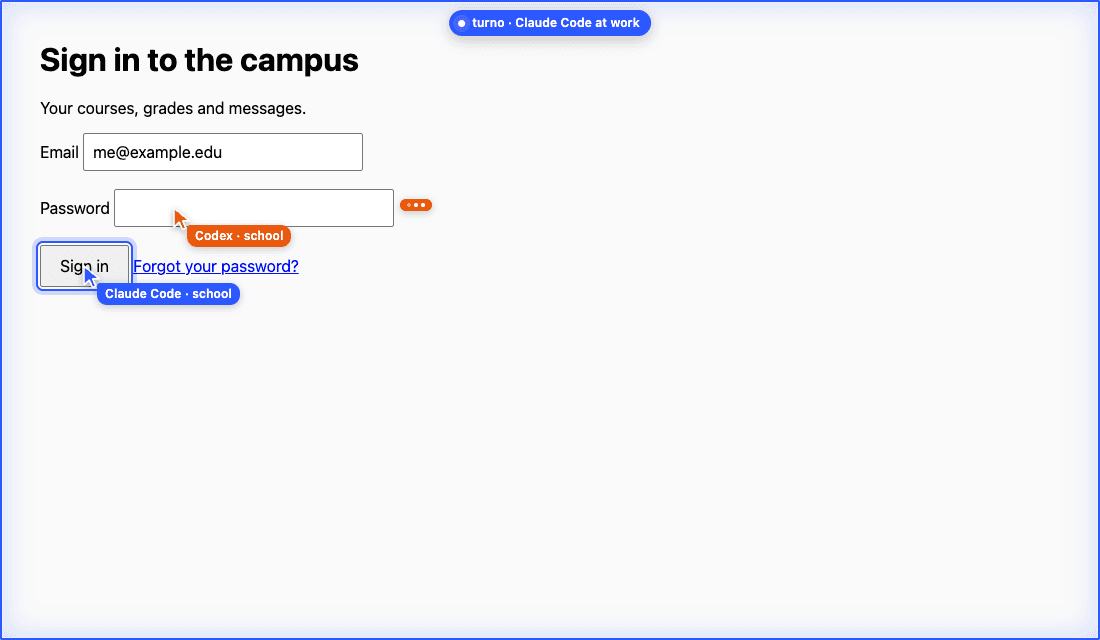
When someone can see the browser, a Chrome window or the live view, each page shows that an agent is at work and where. An arrow with the agent's name glides to each element it acts on, a ring marks the element, a click leaves a ripple, a field being typed into gets a typing bubble, and a thin frame with a badge, "turno · Claude Code at work", goes around the page while calls run. Several agent sessions on one identity's Chrome each get a cursor and a color of their own.
The model does not see it: it is not in snapshots or the page's text, it is never a click target, and it is hidden while the model's screenshot is taken. It is an extra element a page script can notice, so off is there for the sites where that matters.
turno-browser set school --cursor on
turno-browser set school --cursor offBrowser
turno-browser init
The first setup, step by step: it names and creates an identity, opens Chrome so you sign in by hand on a first site, finds the agents installed on your machine and runs the agent's mcp add command only when you say yes. Without a terminal it needs --identity and --agent, and prints the command instead of running it.
npm install --global turno-browser
turno-browser initFixes
- A login that says what it saved:
turno-browser loginopens a page that says what to do instead of a blank tab, and on close names the sites you opened, or says that nothing new was signed in. - When an identity was never signed in:
showhas a "last sign-in" line and local times, anddoctorsays when nobody signed in to an identity by hand. - Plain words:
list,showanddoctorsay "not in use" instead of "free". do <id> endsays that Chrome stays open in the background server, until when, and how to close it now.doerrors no longer start with "Error: Error:", and a stale ref, or text where a ref goes, gets a hint.setup claudesuggestsclaude-code.- Commands that paste into zsh:
addprints each explanation on its own line, with no#comments after the commands.
Links
- Full changelogs: turno-cli and turno-browser.
- The agent cursor, Get started with turno-browser and the turno-browser command reference.