Esta página todavía no está traducida, así que la ves en inglés.
turno-browserActions
The agent cursor
When you can see the browser, it shows where the agent acts: drawn by Chrome itself by default, or a named cursor and a badge in the page.
When someone can see the browser, turno-browser shows where the agent acts. It is on by default, and it is for you: the model never sees it.
Drawn by Chrome (the default)
By default Chrome draws it, over the DevTools protocol, with nothing in the page:
- the element the agent acts on gets Chrome's own highlight, a blue box, from the start of the action to the end of the call;
- each click of the agent leaves Chrome's own ripple where it landed (Chrome 158 and later).
Both are painted by the browser above the page, like the boxes of Chrome's DevTools, so no script of the page can see them: the page's DOM, its mutation observers and its layout stay as they would be without turno. On the reputation bench's probe page, which records the elements no page script made, the cursor drawn in the page shows up as one element (turno-agent-cursor) and Chrome's highlight as none. They show in Chrome's window and in the live view, and the highlight is hidden while browser_take_screenshot runs.
It does not show who is at work: no arrow with the agent's name, no badge, no typing bubble. For those, set cursor to on. When Chrome refuses the protocol calls (an engine without them), the cursor in the page below is drawn instead. Chrome's Overlay.highlightNode is not painted into the live view's frames, which is why the highlight is a box at the element's place: if the page moves under it during the action, the box stays where the element was.
The cursor in the page (on)
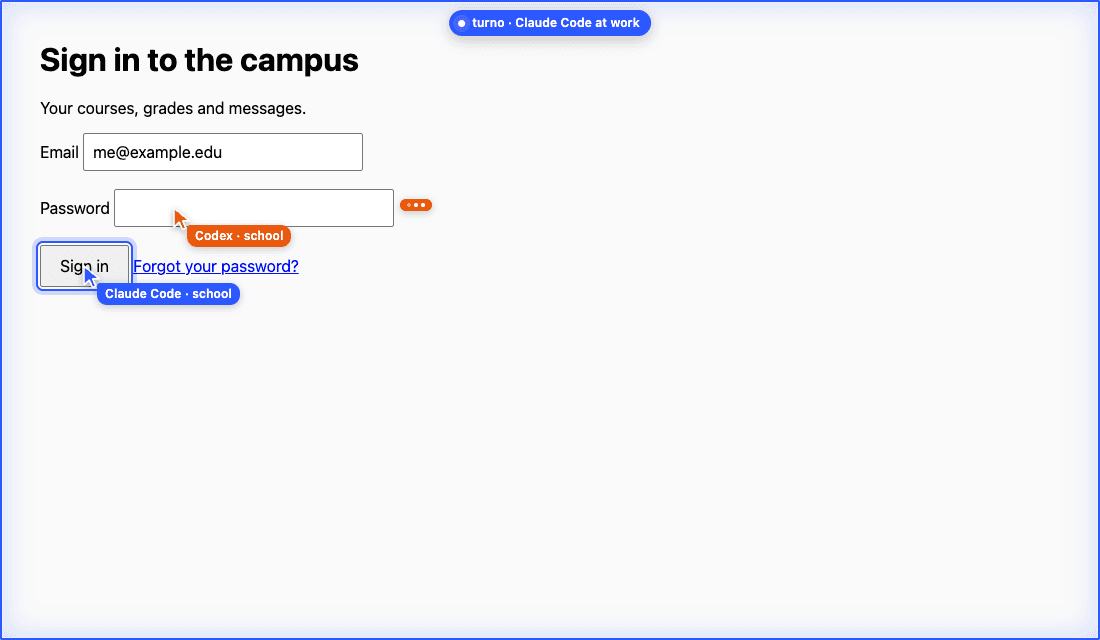
What you see
| On the page | What it tells you |
|---|---|
An arrow with a pill, like Claude Code · school | which agent this is (the MCP client's name) and which identity; it glides to each element the agent acts on |
| A ring on an element | the target of the action in progress |
| A ripple | a click just happened there |
| A bubble by a field | the agent is typing into it |
A thin frame with a badge, turno · Claude Code at work | an agent is driving this page; +N when other sessions are busy too |
With several agents in one browser, each session gets its own color and its own cursor. With human-like input on, the arrow follows the real curved path of the pointer. When your system asks for reduced motion, the cursor does not glide.
During a live view pause the frame turns dashed and the badge says paused · you have the controls.
When it is drawn
cursor in identity.json has three values:
| Value | What it does |
|---|---|
auto (default) | drawn by Chrome when the browser can be seen: Chrome has a window, or the live view is on |
on | the cursor in the page, always drawn |
off | never drawn: pages are left exactly as they are |
turno-browser set school --cursor off
turno-browser show school
turno-browser-mcp --cursor <mode> sets it for one server and wins over identity.json. It is never drawn in read mode: Lightpanda lays out no page.
Out of the model's view
The cursor in the page is drawn in a closed shadow root that is aria-hidden, inert and takes no pointer events. So it is not in snapshots, not in the page's text, never the target of a click, and it is hidden while browser_take_screenshot runs. Recordings and the live view keep it: those are for the person watching.
What it costs
The cursor in the page (on) is an extra element on the page, and a script of the page can notice it. The default adds nothing to the page; off does not draw at all.